Vista Start Menu

Vista Start Menu
License:
Free
Language:
English
Developer:
OS:
Win2000/NT/XP/2003/Vista/7
Updated:
See detailed info

Softonic review

Softonic Editorial Team

“Find the shortcut to the program you want, quickly!”

by Softonic Editorial Team about Vista Start Menu

Each time you start programs from the Start menu, you use an interface that has not changed in 10 years! No wonder it has become more difficult to use as the number of programs has increased...

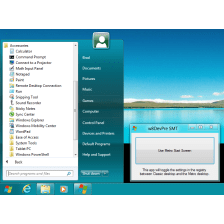
Vista Start Menu is a completely different approach to the interface. In the process of development we were oriented towards how people perceive information and also towards the ability to remember the position of items.

All you see in the standard menu is a long list and you have to read most names in order to find the program you need. Vista Start Menu shows the icons of the program that is why it is much easier to find the program you need with one glance. Besides, the programs are arranged in a table visually divided into sections, which also contributes to finding what you need quickly.

With Vista Start Menu, you just open the menu and click the program icon. If you need supplemental files installed together with the program, just move the mouse pointer over the icon and you will see a submenu where you can find all you need. Vista Start Menu retains the position of icons that is why when you install or remove programs, icons remain in their places. You do not have to spend time on looking for icons that have "slid away" as it usually happens in the standard menu.

Free Download Vista Start Menu 3.88

Vista Start Menu is virus free

We have analyzed the latest version of Vista Start Menu with 30 antivirus engines and it is virus free. See analysis results.

TESTED VIRUS FREE - Softonic GUARANTEED

Developer's description

Each time you start programs from the Start menu, you use an interface that has not changed in 10 years! No wonder it has become more difficult to use as the number of programs has increased...

Vista Start Menu is a completely different approach to the interface. In the process of development we were oriented towards how people perceive information and also towards the ability to remember the position of items.

All you see in the standard menu is a long list and you have to read most names in order to find the program you need. Vista Start Menu shows the icons of the program that is why it is much easier to find the program you need with one glance. Besides, the programs are arranged in a table visually divided into sections, which also contributes to finding what you need quickly.

With Vista Start Menu, you just open the menu and click the program icon. If you need supplemental files installed together with the program, just move the mouse pointer over the icon and you will see a submenu where you can find all you need. Vista Start Menu retains the position of icons that is why when you install or remove programs, icons remain in their places. You do not have to spend time on looking for icons that have "slid away" as it usually happens in the standard menu.

Vista Start Menu (1) User reviews

  • Not bad
  • 7/10
  • davidrogerman davidrogerman
    User reviews
    1
    • Not bad
    • 10/10
    Just what I needed

    With this little sotfware now is more easy for me find the program inside the start menu. It's fast and easy to install. Also it's simple to configure and customize.... More

Your avatar
Review
  1. Maximum: 75 characters

  2. See example

Pros and Cons
Rate
  1. What rating would you give Vista Start Menu?

    You need to fill in all fields

    • Usability:

      Not rated
    • Stability:

      Not rated
    • Installation:

      Not rated
    • Functionality:

      Not rated
    • Appearance:

      Not rated
    • Overall rating:

      Not rated
  2. Don't worry, we won't make your email address public.

You're not allowed to share serial numbers, cracks, etc. or link to pages that contain them. If you do, your user account will be deleted, your IP address logged and legal action will be taken.

Get started - just ask a question!

Write a title for your question.

Alternativesto Vista Start Menu

  • In English:
    Vista Start Menu
    Vista Start Menu

    Find the shortcut to the program you want, quickly!

    Softonic rating:
    • 7/10
    User rating:
    • 7/10
  • Better rating:
    StartupRun
    StartupRun

    List all applications loaded at startup

    Softonic rating:
    • 8/10
    User rating:
    • 8/10
Compare with Vista Start Menu

Screenshots from Vista Start Menu

Download rank: Start Menu Utilities

2 of 26

Softonic rating:
  • Good
  • 7/10
User rating: (3 ratings)
  • Not bad
  • 7/10
Your rating:
Your rating
  • 0

Review and rate this program

Top Downloads: Start Menu Utilities

  • United States
  • Global

  1. Startup Mechanic

    Scan your system and get rid of tracking components

  2. Vista Start Menu
  3. Start Killer
  4. Startup Inspector for Windows
  5. Portable Start Menu

Reviews of Vista Start Menu in other languages